

Passing data between nodes
Use a lead's details, an AI answer, or a call's result from earlier nodes in any later node.
Every node can use what earlier nodes produced: the lead's details from the trigger, the AI's score, the call's summary. There are two ways to insert a value:
- Type
@in any field, pick the node, then the piece of information. - Drag a chip from Variables from previous nodes at the top of the settings panel into a field.
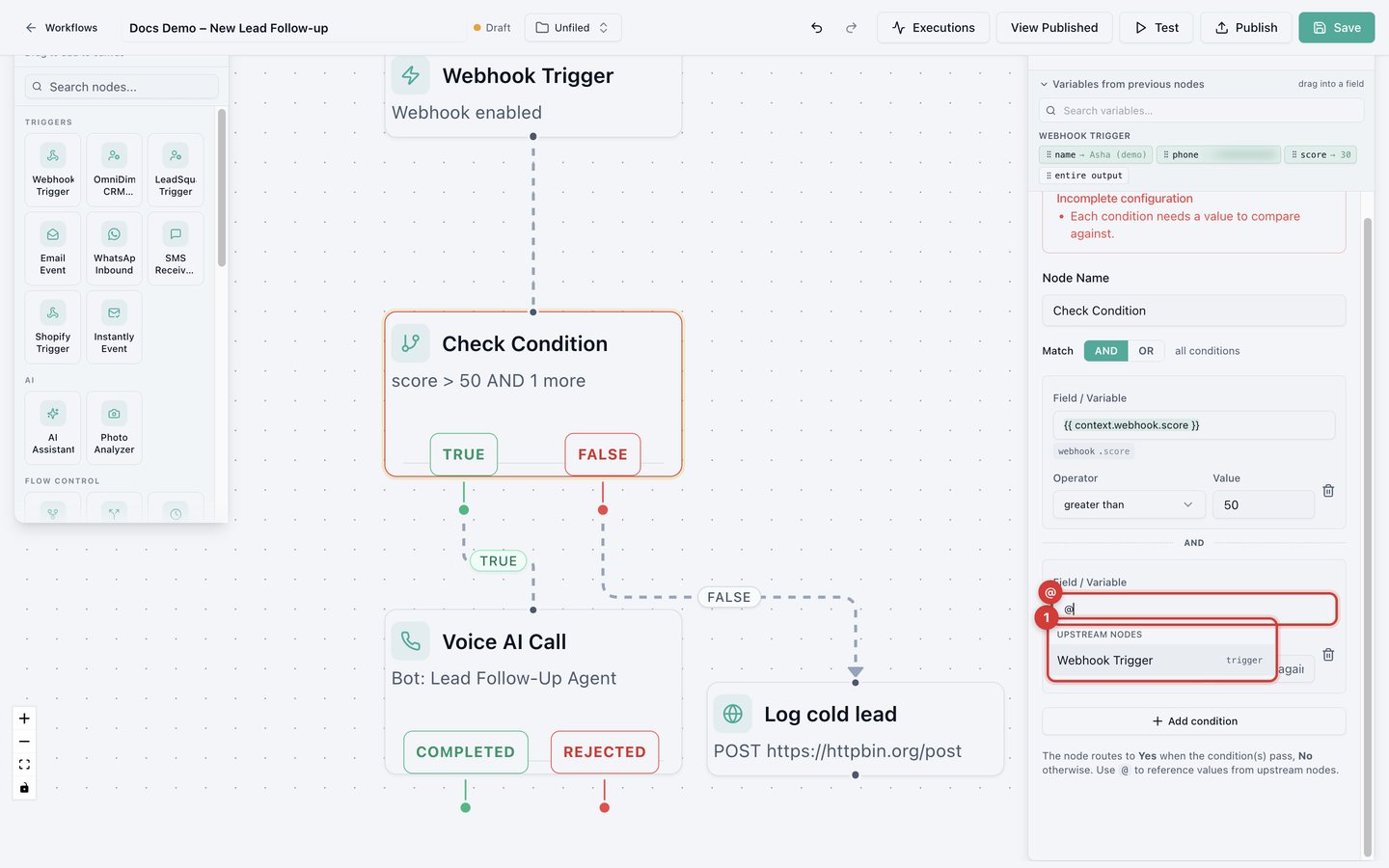
An inserted value shows in double curly braces, for example
{{ context.webhook.phone }}, with a small label underneath naming where it
comes from. Mix values with normal text, for example "Hi
{{ context.webhook.name }}, thanks for your interest!"
Data sent to a Webhook Trigger is available as context.webhook, so a
phone field in the payload is {{ context.webhook.phone }}.
See real sample values
The variables list shows sample values once a node has been tested. Run a single-node test early, and the list fills with real examples you can drag.
Phone number formats
Voice AI Call and Add to Bulk Call expect international format with the
country code, for example +15551234567. For WhatsApp Inbound, ready-made
formats turn the sender's number into international format with dashes
(+91-9800000000) or the national number only (9800000000).