

Submit a KYC verification step
Run one step of a client's identity verification. One endpoint handles every step: the step path parameter names the step, and the body carries user_id, region, carrier, and whatever that step needs. The example below is the register step on carrier-1.
Reseller accounts only. Request access.
steprequiredID of the client completing verification.
Region this verification is for.
The carrier to verify on: verification is per carrier, so this decides which flow the client walks and which record it writes. Always required, and omitting it returns 409 carrier_required naming that region's carriers.
Customer's full name. Required for register.
Customer's email address. Required for register.
curl -X POST 'https://backend.omnidim.io/api/v1/reseller/kyc/steps/{step}' \
  -H 'Authorization: Bearer YOUR_API_KEY' \
  -H 'Content-Type: application/json' \
  -d '{
  "user_id": 1234,
  "region": "IN",
  "carrier": "carrier-1",
  "name": "Demo User",
  "email": "demo@example.com",
  "phone": "+919876543210"
}'
{
  "success": false,
  "status": "string",
  "next_step": "string",
  "method": "submit",
  "redirect_url": "string",
  "reusable": false,
  "poll_step": "string",
  "message": "string",
  "preview": {
    "client": {
      "name": "string",
      "email": "demo@example.com",
      "mobile": "string",
      "country_code": "string"
    },
    "pan": {
      "pan": "string",
      "business_type": "string"
    },
    "aadhar": {
      "name": "string",
      "address": "string"
    },
    "gst": {
      "gst_num": "string",
      "gstin": "string"
    }
  }
}
Authorization
BearerAuth Bearer token authentication. Obtain your API key from the OmniDimension dashboard.
In: header
Path Parameters
The verification step to run. Not a fixed list: carriers do not run
the same checks, so take the names from
GET /reseller/kyc/requirements for the carrier you are on.
Request Body
application/json
TypeScript Definitions
Use the request body type in TypeScript.
Response body
application/jsonResponse Body
application/json
application/json
application/json
application/json
application/json
application/json
application/json
application/json
What each step sends and returns
Every call is a POST to this endpoint with the step name in the path. The body
always carries user_id, region, and carrier, plus the fields in the
table below. Steps with no fields of their own take just those three.
Every response has the same shape:
{
  "success": true,
  "status": "otp_verified",
  "next_step": "verify-pan",
  "message": "Contact details verified."
}
next_step is the field to act on. Run it, read the next one off that response,
and keep going until there is nothing left to run.
Do not hard-code the step names
A region can have more than one carrier, and carriers do not run the same checks. One sends a code to the customer's phone and email; another has no such step at all and verifies identity through a link the customer opens themselves. So the step list is data, not a constant.
Call GET /reseller/kyc/requirements?region=IN&carrier=carrier-1 first. It
returns the steps for that carrier in order, the body fields each one needs,
and how each one is performed. Then follow next_step. Written that way, one
integration works for every carrier and keeps working when a carrier's flow
changes.
The three kinds of step
Each step in /requirements carries a method. Branch on that, never on the
step's name.
method | What you do |
|---|---|
submit | POST the fields listed in required. |
otp | POST a code the customer received. Rate-limited, so leave ~30s between attempts. |
redirect | We return a redirect_url. Send your customer there in their own browser, then poll poll_step until it reports success. |
Redirect steps: the link is single use
A redirect response looks like this:
{
  "success": true,
  "status": "aadhaar_pending",
  "method": "redirect",
  "redirect_url": "https://...",
  "reusable": false,
  "next_step": "aadhaar-status",
  "poll_step": "aadhaar-status",
  "message": "Open the link to verify with DigiLocker, then poll for the result."
}
The link expires within minutes and must never be stored or re-served. If
your customer abandons the flow, closes the tab, or a popup blocker eats it,
call the step again: repeating it is safe and always hands back a fresh link.
Serving a saved link takes the customer to an access-denied page and sends them
back to the start. That is why reusable is stated as a field rather than left
to prose.
next_step moves to the poll step, and stays there until the customer actually
finishes at the provider. So a poll that keeps answering aadhaar-status means
"hand them a new link", not "you missed a step".
A finished submission the carrier is still reviewing
next_step: null means there is nothing left for you to run. It does not
always mean the client can buy: some carriers hold a completed submission for
their own review. When that happens can_purchase stays false and
review_status on GET /reseller/kyc/status says so. Poll status rather than
resubmitting.
Fixed vocabularies
Some fields accept only certain values. Every step in /requirements carries a
choices object listing them per field, so build your dropdown from that:
sending anything outside a published list is refused with 400 invalid_request
naming what is allowed. business_type is the one to watch, because the
accepted values are not the same on every carrier.
The two carriers in region IN
Verified against the live step tables as of this writing. Read them as an
illustration of the shape, not as a contract, and take the real list from
/requirements for the carrier you are on.
carrier-1
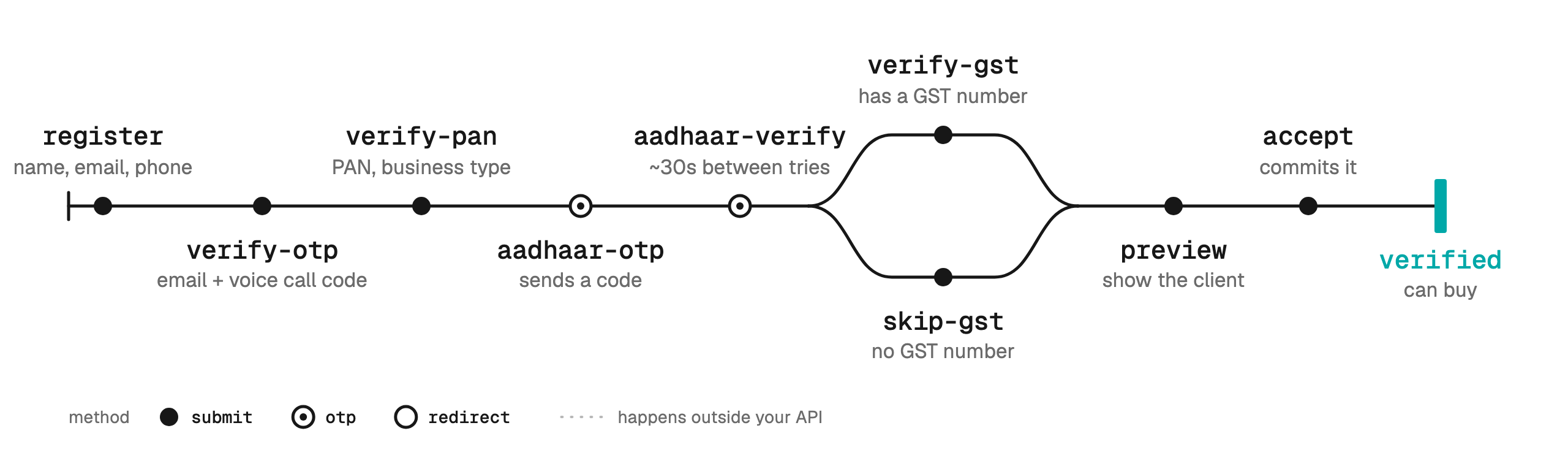
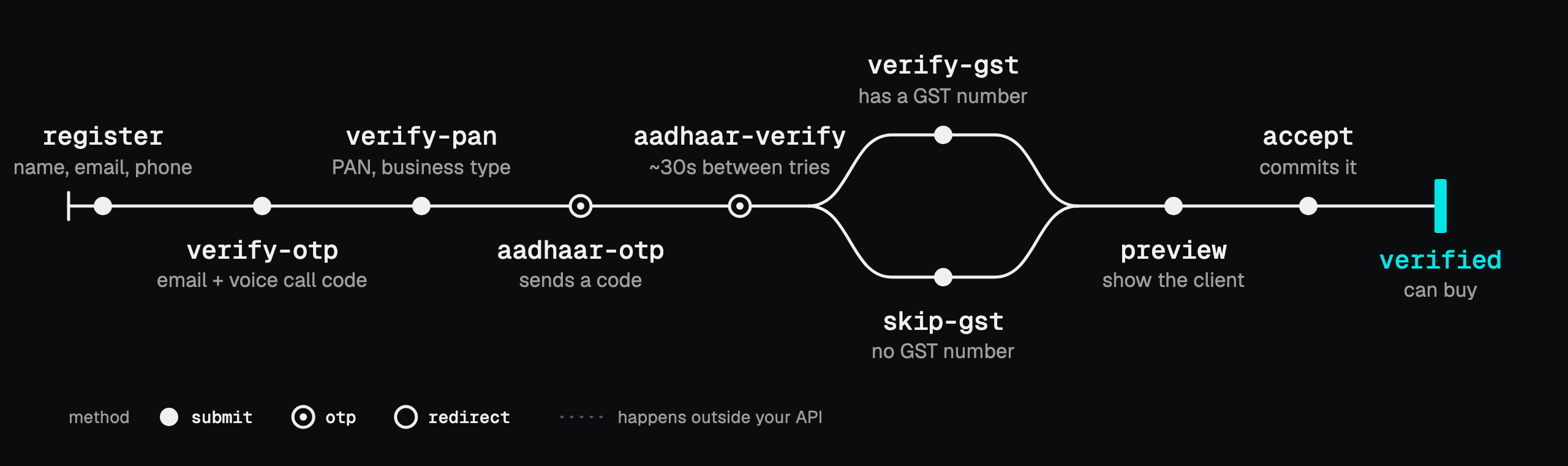
| Step | Body fields you add | next_step you get back | method |
|---|---|---|---|
register | name, email, phone | verify-otp | submit |
verify-otp | mobile_otp, email_otp | verify-pan | submit |
verify-pan | pan, business_type | aadhaar-otp | submit |
aadhaar-otp | aadhaar | aadhaar-verify | otp |
aadhaar-verify | otp | verify-gst | otp |
verify-gst | gst | preview | submit |
skip-gst | none | preview | submit |
preview | none | accept | submit |
accept | none | null | submit |
The email code arrives in the client's inbox; the mobile code arrives as an automated voice call that reads the code out.
carrier-2-new
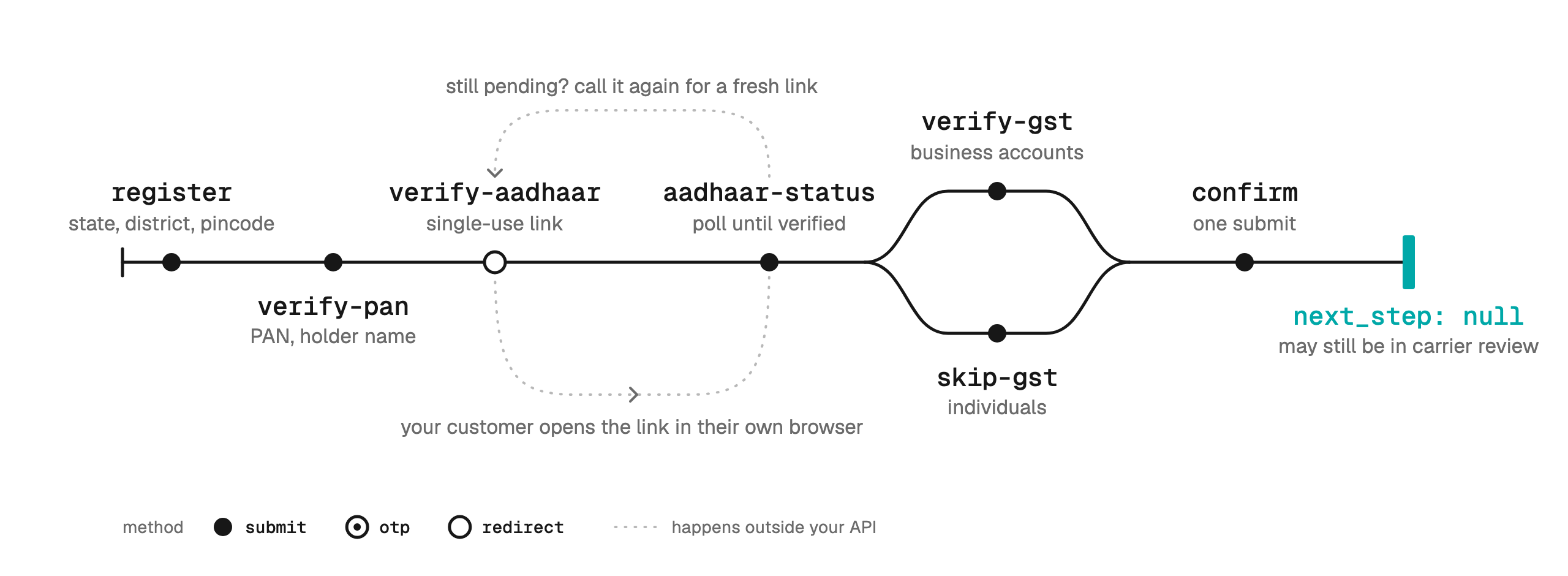
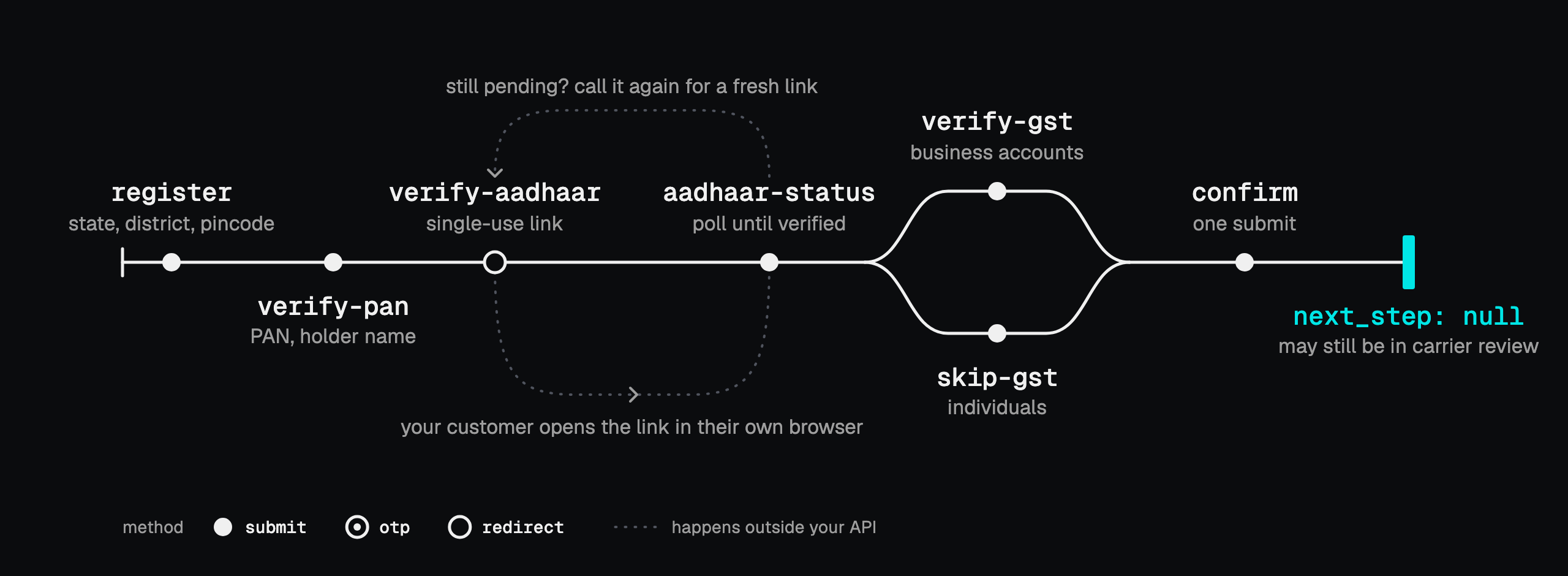
| Step | Body fields you add | next_step you get back | method |
|---|---|---|---|
register | name, email, phone, state, district, pincode, and optionally account_type + business_name | verify-pan | submit |
verify-pan | pan, pan_holder_name | verify-aadhaar | submit |
verify-aadhaar | none | aadhaar-status | redirect |
aadhaar-status | none | aadhaar-status until verified, then verify-gst | submit |
verify-gst | gst | confirm | submit |
skip-gst | none | confirm | submit |
confirm | none | null | submit |
Four differences from carrier-1 worth planning for:
- No contact verification at all. This carrier sends no codes, so
registergoes straight to PAN. registeris district-level. It takesstate,districtandpincode, and the district is validated against the state: a mismatch is rejected with nothing written.account_typeis fixed at registration. Optional, defaults toindividual, and cannot be changed afterwards. Only a business account can verify GST, so an individual runsskip-gst. Sendbusiness_namewith it when it isbusiness.confirmis one submit, with no preview and no signature. It can land onsubmitted: every step done, the carrier still reviewing.
On both carriers verify-gst and skip-gst are a choice: run one or the
other.
Region US: carrier-us
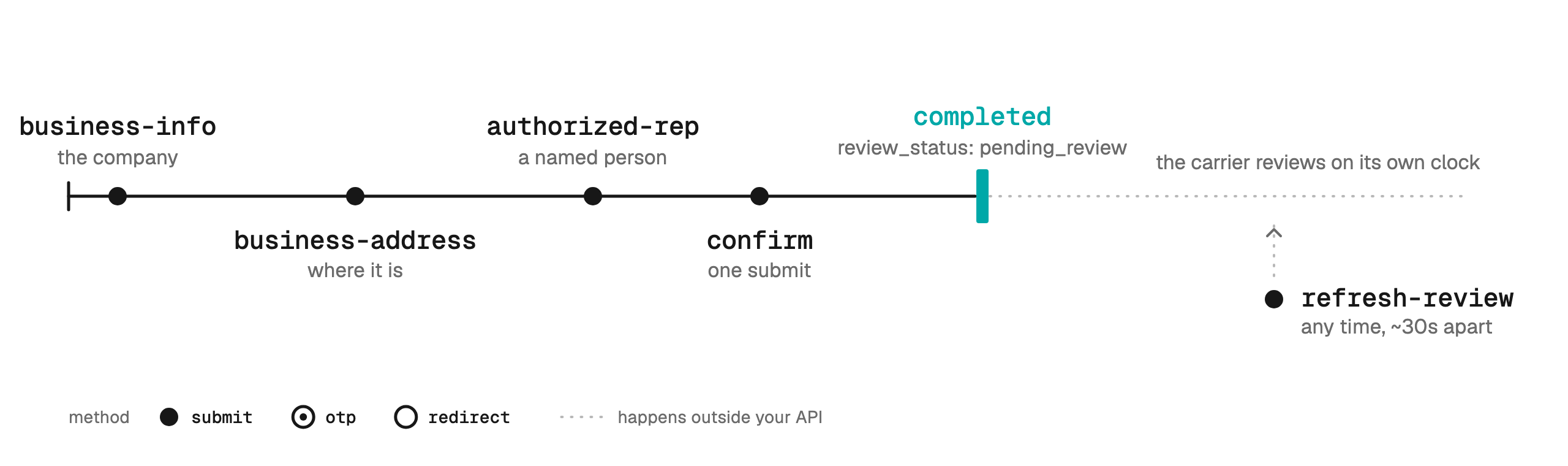
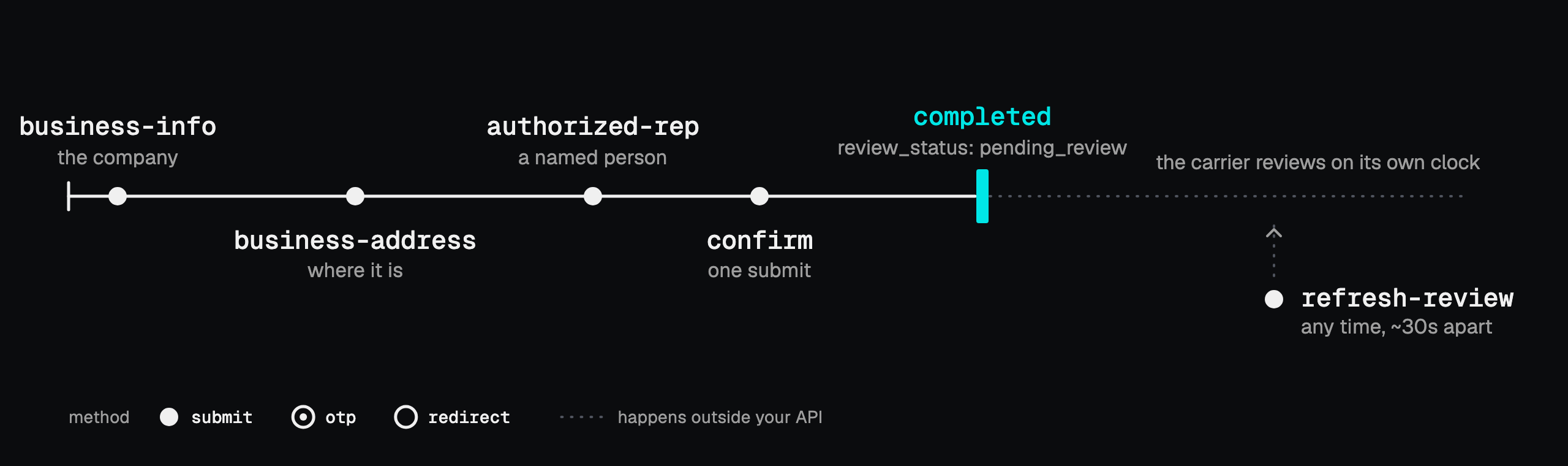
Business verification rather than identity verification: no OTP, no PAN, no Aadhaar. Three forms, then one submit that hands the whole thing to the carrier's own review.
| Step | Body fields you add | next_step you get back | method |
|---|---|---|---|
business-info | business_name, business_type, business_identity, business_industry, ein, website_url, and optionally regions_of_operation | business-address | submit |
business-address | street, city, state, postal_code, and optionally country | authorized-rep | submit |
authorized-rep | first_name, last_name, email, phone, business_title, job_position | confirm | submit |
confirm | none | null | submit |
refresh-review | none | unchanged | submit |
business_type, business_identity, business_industry,
regions_of_operation and job_position all come from fixed lists. Read them
from choices.
confirm creates the account with the carrier and opens their review, so
status becomes completed while review_status on
KYC status reports
pending_review. The carrier reviews on its own clock: refresh-review asks
where that stands and is never returned as a next_step, so call it when you
want an update rather than in sequence. It is throttled to roughly one call
every 30 seconds.
The one step that returns more
preview, on the carrier that has it, returns everything the client should
confirm before accept commits it, alongside the usual fields:
{
  "success": true,
  "status": "preview",
  "next_step": "accept",
  "message": "Review the details, then call accept.",
  "preview": {
    "client": { "name": "Demo User", "email": "demo@example.com", "mobile": "9876543210", "country_code": "91" },
    "pan": { "pan": "ABCDE1234F", "business_type": "proprietorship" },
    "aadhar": { "name": "Demo User", "address": "..." },
    "gst": { "gst_num": "29ABCDE1234F1Z5", "gstin": "..." }
  }
}
Anything the verification provider does not hold yet is left out, so treat each block as optional.
Resending a code
resend-otp takes the same user_id, region and carrier as any other
step, and answers next_step: verify-otp like the step it belongs to. It sits
outside the sequence and is never returned as a next_step, so call it only
when the client says a code did not arrive.
One optional field controls where the resend goes: type is email,
mobile, or both (default both). Separate per-channel resend buttons in
your interface map to type: "email" and type: "mobile"; the mobile resend
places the voice call again.
Order is enforced
Calling a step before its prerequisite is complete returns 409 step_order
naming the step to run first, so following next_step is all you need to stay
in order.
A 409 carrier_required is a different thing: the region has more than one
carrier and the request named none. Its body lists them, with what each one
stocks, so pick one and retry.
What you may keep
You are relaying what the client types into your own interface, nothing more. Never store the values you send in these requests once the call completes, and redact them from your own request logs. That covers the OTPs, the PAN, the Aadhaar number, the GST number, and the redirect link.
The full loop, with the step diagram, is in the Reseller API guide.