

Make, Zapier, n8n, GHL
Connect Make, Zapier, n8n, and GHL to your OmniDimension agent to automate workflows.
There are two ways you can integrate OmniDimension with automation platforms like Make, Zapier, n8n, and GHL.
- Webhook method: send data from OmniDimension to Make, Zapier, n8n, or GHL once the call is completed.
- API method: trigger OmniDimension actions from Make, Zapier, n8n, or GHL.
New to webhooks on these platforms? See their docs: Make, Zapier, n8n.
Webhook method: send post-call data to Make, Zapier, n8n, GHL
Open the agent's post-call tab
Navigate to your agent's page in the OmniDimension dashboard and go to the Post-Call tab.
Set the delivery method to webhook
Set the delivery method to Webhook and paste the webhook URL from Make (HTTP module), Zapier (Webhook trigger), or n8n (Webhook node).

Test the connection
Click Test Connection to verify and inspect the payload from your automation platform.
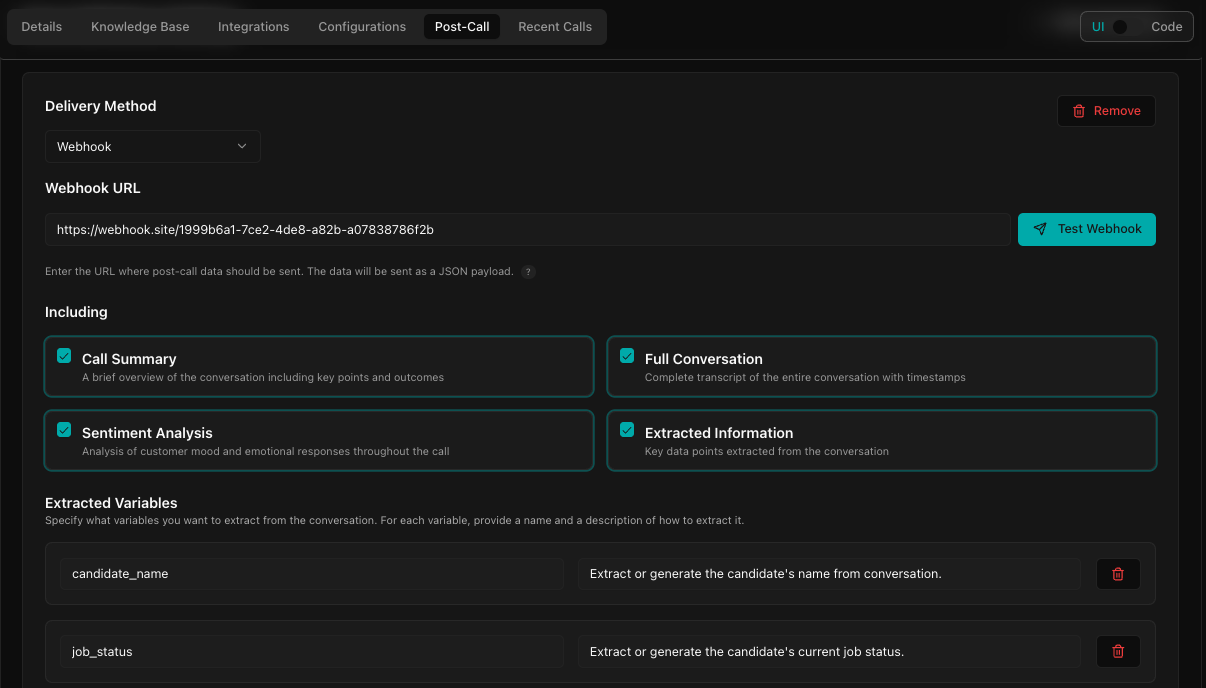
Sample webhook payload
{
  "call_id": 24877,
  "bot_id": 551,
  "bot_name": "Your Bot Name",
  "phone_number": "+1234567890",
  "call_date": "2025-05-22 05:02:54",
  "user_email": "user@example.com",
  "call_report": {
    "summary": "Brief overview of the conversation...",
    "sentiment": "Positive",
    "extracted_variables": {
      "name": "Ravi",
      "appointment_type": "Dental Checkup"
    },
    "full_conversation": "Full transcript here...",
    "interactions": [
      {
        "sequence": 1,
        "user_query": false,
        "bot_response": "Hello, how can I help you?",
        "time": "2025-05-22 05:02:42"
      },
      {
        "sequence": 2,
        "user_query": "I want a dental appointment",
        "bot_response": "Sure, I can help with that.",
        "time": "2025-05-22 05:02:45"
      }
    ]
  }
}
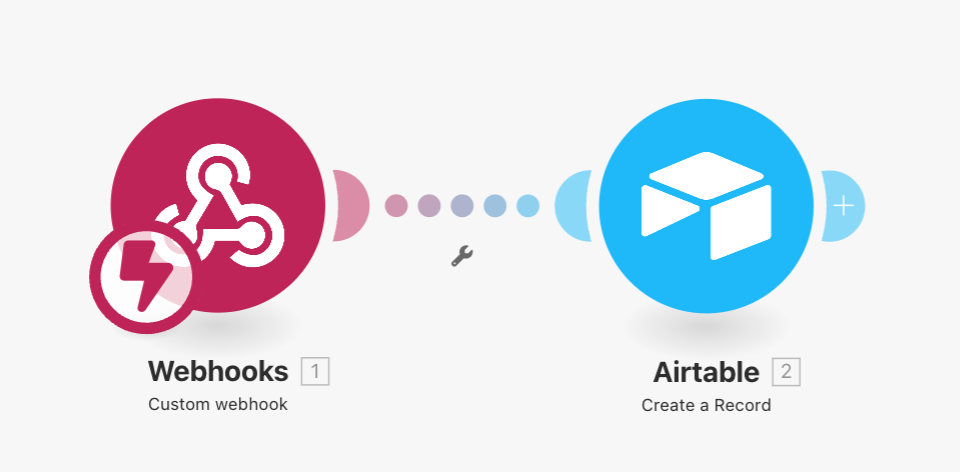
Example: add call logs to an Airtable database using Make.com
- Create a webhook in Make.com
- Set the webhook URL in your post-call agent configuration following the guide above
- Test the webhook by sending a sample payload
- For other platforms: Webhook node for n8n, Webhook trigger for Zapier, Workflow Actions Webhook for GHL
API method: call OmniDimension actions from Make, Zapier, n8n, GHL
- Use OmniDimension's REST APIs to trigger actions like creating an agent, dispatching calls, or updating the knowledge base
- Use HTTP modules and nodes in your automation tool to make requests to OmniDimension API endpoints
- Ensure your API key is set correctly in request headers
Common OmniDimension API endpoints
POST /api/v1/agents— create a new agentPOST /api/v1/calls/dispatch— trigger an outbound callPOST /api/v1/knowledge_base/create— add knowledge entriesGET /api/v1/calls/logs/:id— retrieve a conversation log
Example: call dispatch using Make.com
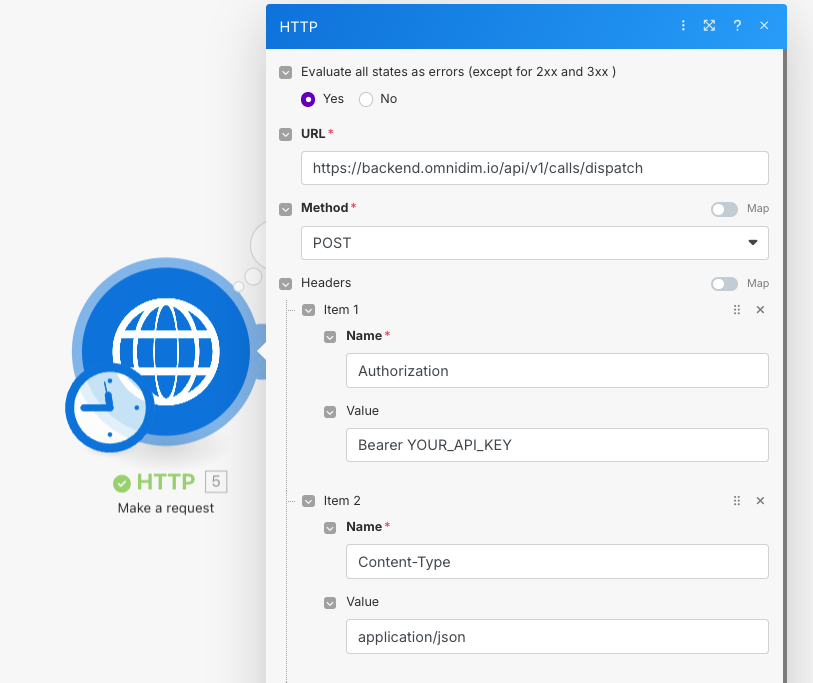
Add an HTTP module
Create a new HTTP module in Make.com and set the HTTP method to POST.
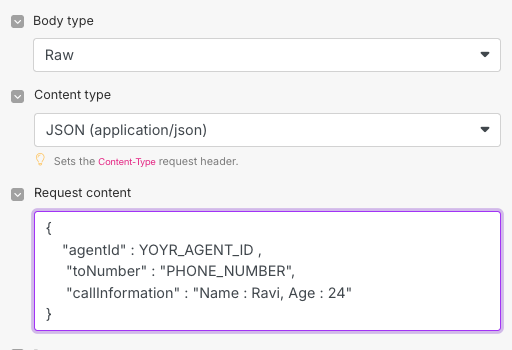
Configure the request
Paste the OmniDimension API endpoint for call dispatch. Add the API key
in the Authorization header. Set the request body to include
agent_id, phone_number, and call_context.
Save and test
Save the module. For other platforms: HTTP Request node for n8n, Workflow Actions Webhook for GHL, Webhook trigger for Zapier.
Tips and best practices
- Always test webhooks with tools like webhook.site or RequestBin
- Use conditional logic in workflows based on extracted variables
- Handle failures and retries in automation tools for reliability