# Verify a client (/docs/reseller/your-clients/verification)
> The identity and business checks a client passes before it can buy a number, carrier by carrier. Ask which step is next, run it, and follow the chain.
Where a region requires it, a client has to be verified before it can buy a number. For India
that is an Aadhaar eKYC, so each check clears in minutes. For the US it is business verification.
Verification is per carrier. A client verified on one carrier of a region still has to verify on
the other before it can buy there, and the two do not run the same steps. **`carrier` is required
on every verification and number call**, in every region, however few carriers it holds.
This page is the whole verification flow. The endpoints are in the
[API reference](/docs/api-reference/reseller-verification/getResellerKycStatus); the flow from
adding a client to buying a number is on the [Reseller API](/docs/reseller-api) page.
## The carriers [#the-carriers]
| Carrier | Region | Stocks | Verification in short |
|---|---|---|---|
| [Carrier 1](#carrier-1): `carrier-1` | `IN` | Landline, city codes 11, 12 and 80 | Codes by email and voice call, PAN, Aadhaar by OTP, preview, accept |
| [Carrier 2](#carrier-2-new): `carrier-2-new` | `IN` | Mobile, 94 and 79 series | PAN, Aadhaar through a link, a document after each check, confirm |
| [US carrier](#carrier-us): `carrier-us` | `US` | US local, by area code | Business details, address, authorized representative, confirm |
You should not hard-code that table. Call without a `carrier` and the refusal lists the region's
carriers with what each one stocks, so you pick up a carrier we add later without shipping
anything.
## The loop [#the-loop]
Read the status once to get the first step, then follow `next_step` until the status is
`completed`.
```http
GET /api/v1/reseller/kyc/status?user_id=CLIENT_ID®ion=IN&carrier=carrier-1
```
The response has a `regions` array, one entry per carrier, each with that carrier's `status`, its
`next_step`, and whether the client `can_purchase` on it yet.
One read to start, then each step response hands you the next one. When a step
comes back `completed`, verification is done and the client can buy. That is the same state the
purchase endpoint checks, so there is nothing else to poll.
```text
carrier = "carrier-1"
status = GET /kyc/status?user_id=CLIENT_ID
next = status.regions.find(r => r.carrier == carrier).next_step
while next:
step = POST /kyc/steps/{next} { user_id: CLIENT_ID, region: "IN", carrier: carrier, ...fields }
next = step.next_step
# status is completed. The client can now buy a number on that carrier.
```
One endpoint runs every step. The step name is the last part of the path, and its fields go in the
body.
```http
POST /api/v1/reseller/kyc/steps/{step}
```
## What a step can ask for [#what-a-step-can-ask-for]
Ask for the carrier's steps and the shape of each field:
```http
GET /api/v1/reseller/kyc/requirements?region=IN&carrier=carrier-1
```
Every step comes back with a `method`, and that is the one thing to branch on:
- `submit` posts the required fields.
- `otp` posts a code the client received.
- `redirect` hands you a URL to open in the client's own browser, plus the step to poll for the
outcome.
- `upload` sends a document as `multipart/form-data`, with the file in `document`.
`/requirements` also publishes each field's `patterns` (such as the PAN or GSTIN format),
`required_if` for fields needed only with some answers, `choices` for its fixed lists, and
`optional` for fields it accepts but never needs. An `upload` step carries `document`: the form
field, the accepted formats, and the size limit. So you can check values in your own form before
you send them.
A region we cannot verify through the API returns `404 not_available` rather than an empty list.
Check `kyc_required` on the status call to know whether a region needs verification at all before
a purchase.
---
## Carrier 1 [#carrier-1]
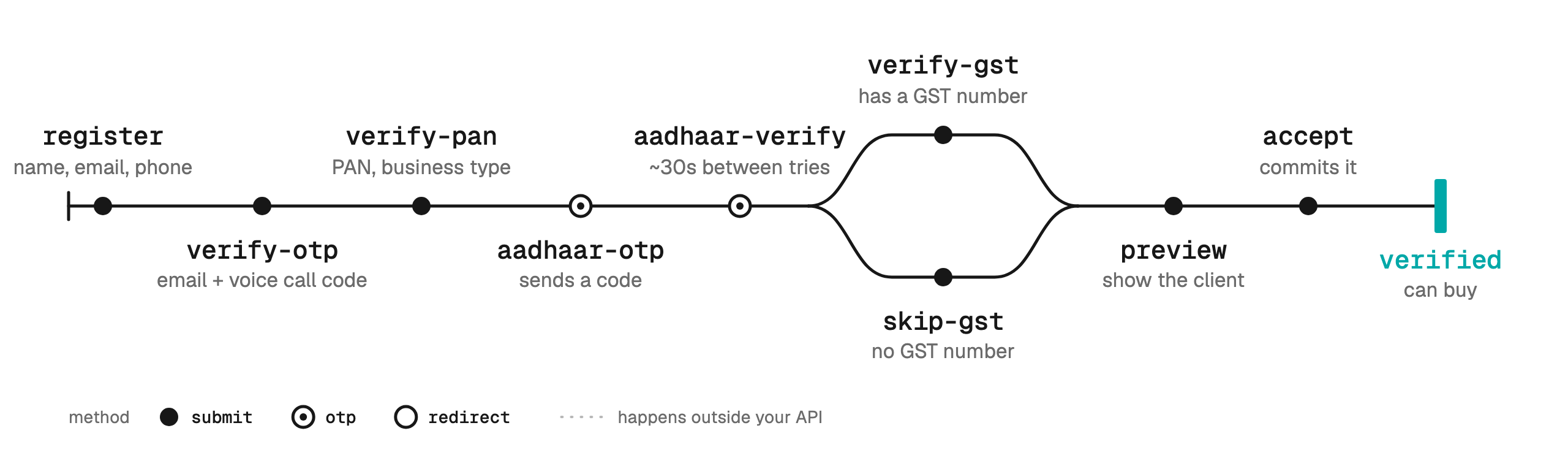
Send `"carrier": "carrier-1"` with region `IN`, landline numbers.
| # | Step | Fields you send | `method` | `next_step` after it |
|---|---|---|---|---|
| 1 | `register` | `name`, `email`, `phone` | `submit` | `verify-otp` |
| 2 | `verify-otp` | `mobile_otp`, `email_otp` | `submit` | `verify-pan` |
| 3 | `verify-pan` | `pan`, `business_type` | `submit` | `aadhaar-otp` |
| 4 | `aadhaar-otp` | `aadhaar` | `otp` | `aadhaar-verify` |
| 5 | `aadhaar-verify` | `otp` | `otp` | `verify-gst` |
| 6 | `verify-gst` **or** `skip-gst` | `gst`, or nothing | `submit` | `preview` |
| 7 | `preview` | none | `submit` | `accept` |
| 8 | `accept` | none | `submit` | `null`: verified |
- **Two codes at `verify-otp`.** The email code arrives in the client's inbox. The mobile code
arrives as an automated voice call that reads it out. If one did not arrive, call `resend-otp`
with `type` set to `email`, `mobile`, or `both` (the default). It is never returned as a
`next_step`.
- **`business_type`** is `proprietorship`, `company`, or `firm`.
- **GST is a choice here.** Run `verify-gst` with the GST number, or `skip-gst`.
- **`preview` returns what the client confirms** before `accept` commits it. Anything the
verification provider does not hold yet is left out, so treat each block as optional.
```json
{
"success": true,
"status": "preview",
"next_step": "accept",
"message": "Review the details, then call accept.",
"preview": {
"client": { "name": "Demo User", "email": "demo@example.com", "mobile": "9876543210", "country_code": "91" },
"pan": { "pan": "ABCDE1234F", "business_type": "proprietorship" },
"aadhar": { "name": "Demo User", "address": "..." },
"gst": { "gst_num": "29ABCDE1234F1Z5", "gstin": "..." }
}
}
```
---
## Carrier 2 [#carrier-2-new]
Send `"carrier": "carrier-2-new"` with region `IN`, mobile numbers.
No codes are sent on this carrier. Instead, each check is followed by its document, and the
account type decides whether there is a GST step.
| # | Step | Fields you send | `method` | `next_step` after it |
|---|---|---|---|---|
| 1 | `register` | `name`, `email`, `phone`, `state`, `district`, `pincode`, `account_type`, and `business_name` for a business | `submit` | `verify-pan` |
| 2 | `verify-pan` | `pan`, `pan_holder_name` | `submit` | `upload-pan` |
| 3 | `upload-pan` | the PAN card in `document` | `upload` | `verify-aadhaar` |
| 4 | `verify-aadhaar` | optionally `return_url` | `redirect` | `aadhaar-status` |
| 5 | `aadhaar-status` | none | `submit` | `upload-aadhaar` once verified |
| 6 | `upload-aadhaar` | the Aadhaar document in `document` | `upload` | business: `verify-gst`. Individual: `confirm` |
| 7 | `verify-gst` | `gst` | `submit` | `upload-gst` |
| 8 | `upload-gst` | the GST certificate in `document` | `upload` | `confirm` |
| 9 | `confirm` | none | `submit` | `null` |
Steps 7 and 8 are for business accounts only. So the two paths are:
- **Individual:** `register`, `verify-pan`, `upload-pan`, `verify-aadhaar`, `aadhaar-status`,
`upload-aadhaar`, `confirm`.
- **Business:** the same, with `verify-gst` and `upload-gst` before `confirm`.
### Register: the account type is permanent [#register-the-account-type-is-permanent]
`account_type` is `individual` (the default) or `business`, and it cannot be changed after
`register`. A business must also send `business_name`, exactly as it appears on its GST
certificate, because the GST check compares the two.
`phone` is a 10-digit mobile number and `pincode` a 6-digit PIN code. The `district` is checked
against the `state`, and a mismatch is refused with nothing written.
---
## US carrier [#carrier-us]
Send `"carrier": "carrier-us"` with region `US`, US local numbers.
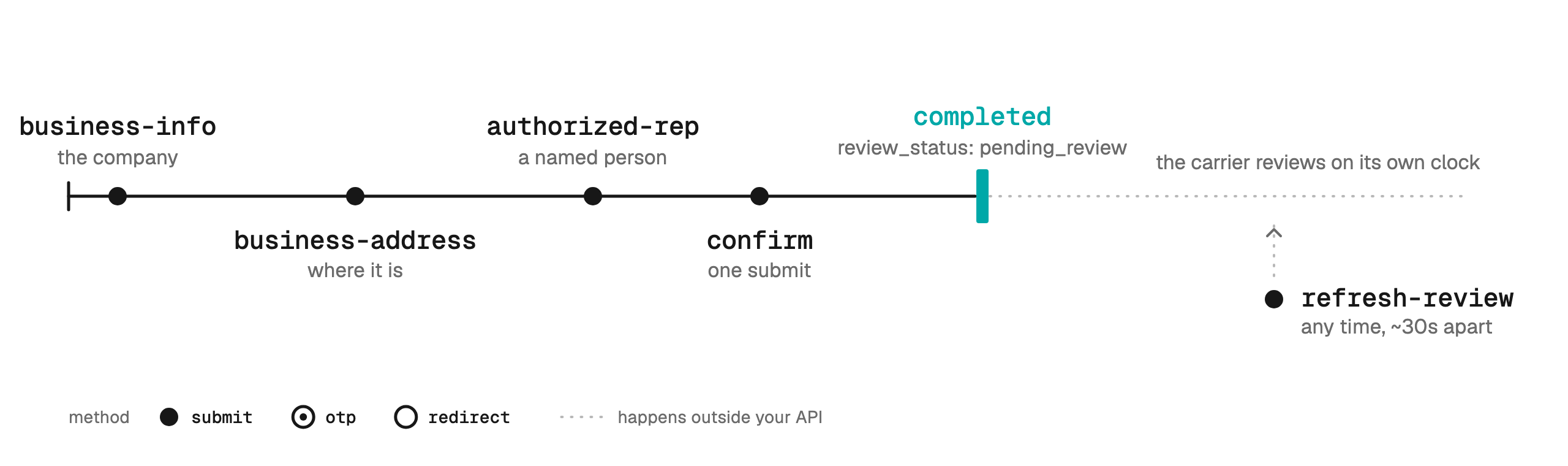
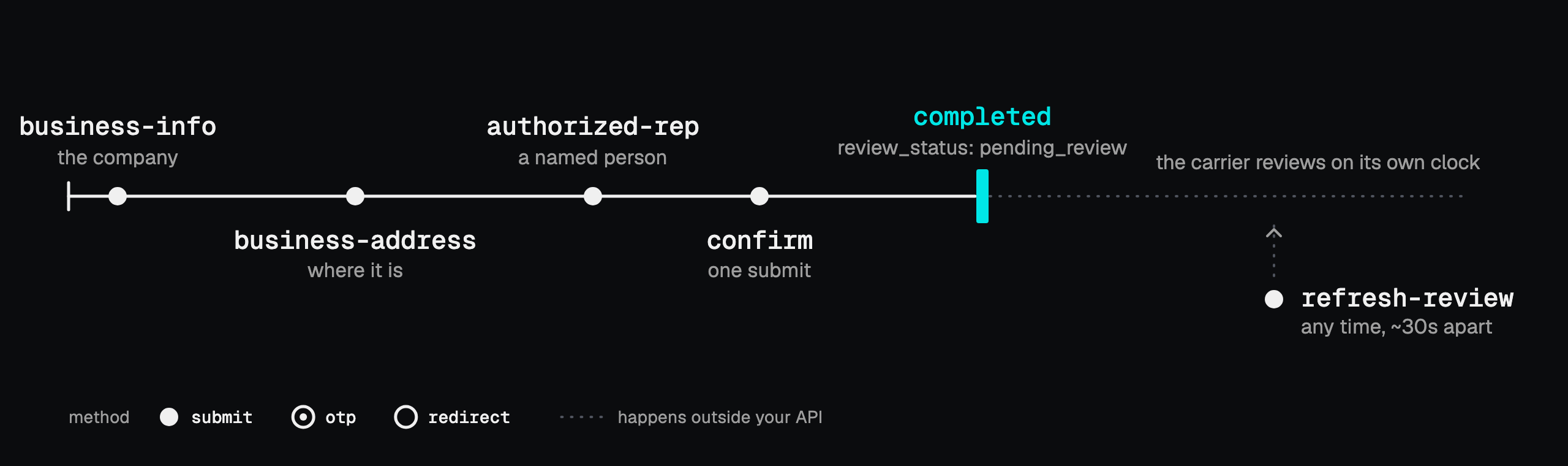
Business verification rather than identity verification: no codes, no PAN, no Aadhaar. Three
forms, then one submit that hands everything to the carrier's review.
| # | Step | Fields you send | `method` | `next_step` after it |
|---|---|---|---|---|
| 1 | `business-info` | `business_name`, `business_type`, `business_identity`, `business_industry`, `ein`, `website_url`, and optionally `regions_of_operation` | `submit` | `business-address` |
| 2 | `business-address` | `street`, `city`, `state`, `postal_code`, and optionally `country` | `submit` | `authorized-rep` |
| 3 | `authorized-rep` | `first_name`, `last_name`, `email`, `phone`, `business_title`, `job_position` | `submit` | `confirm` |
| 4 | `confirm` | none | `submit` | `null` |
- `business_type`, `business_identity`, `business_industry`, `regions_of_operation`, and
`job_position` come from fixed lists. Read them from `choices` on KYC requirements.
- After `confirm`, `status` is `completed` and `review_status` is `pending_review`.
`refresh-review` asks the carrier where its review stands. It is never returned as a
`next_step`, so call it when you want an update, about 30 seconds apart.
---
## The redirect step [#the-redirect-step]
```json
{
"status": "aadhaar_pending",
"method": "redirect",
"redirect_url": "https://provider.example/verify/one-time-link",
"reusable": false,
"poll_step": "aadhaar-status"
}
```
The link is good for one attempt. It carries a provider token that expires within minutes, so do
not store it and never serve a stored one. If the client closes the tab or the link expires, run
the step again for a fresh link, about 30 seconds apart.
Pass `return_url` to bring the client back into your own app, for example
`https://app.example.com/kyc/done`. It must be `https` with a host, no `#fragment`, and no
credentials, up to 2,000 characters. Whatever you do, polling `poll_step` is what completes the
step, so poll even if the browser never comes back.
## The upload step [#the-upload-step]
On carriers that need documents, each check is followed by its document, and `next_step` points at
the upload when one is due. Send the step as `multipart/form-data`:
```bash
curl -X POST https://backend.omnidim.io/api/v1/reseller/kyc/steps/upload-pan \
-H "Authorization: Bearer $OMNIDIM_API_KEY" \
-F user_id=CLIENT_ID -F region=IN -F carrier=carrier-2-new \
-F document=@pan-card.pdf
```
The file must be a JPG, PNG, or PDF up to 10 MB, and its contents must match its extension. The
step name decides which document it is, so there is no type field to send. Uploading again
replaces the earlier document.
## Errors [#errors]
| Status | Slug | Meaning |
|---|---|---|
| 400 | `invalid_request` | A field is missing, outside its fixed list, or in the wrong shape. `/requirements` publishes `choices` and `patterns` |
| 409 | `step_order` | You ran a step too early. `next_step` says which one to run first |
| 409 | `carrier_required` | The region has more than one carrier and the call named none |
| 422 | `verification_failed` | The details or the file were refused. Fix them with the client |
| 429 | `too_fast` | An Aadhaar step was retried within about 30 seconds |
| 503 | `service_unavailable` | The verification service is down. Nothing is wrong with the details. Retry in a few minutes |
A `step_order` refusal does not start the wait. If the client did not get their code, call `resend-otp`
while they are on the OTP step.
You are passing what your client types into your interface, nothing more. Do not store the
values you send, and redact them from your logs. That covers the PAN, the Aadhaar number, every
one-time code, the GST number, the redirect link, and every document file.
 | # | Step | Fields you send | `method` | `next_step` after it |
|---|---|---|---|---|
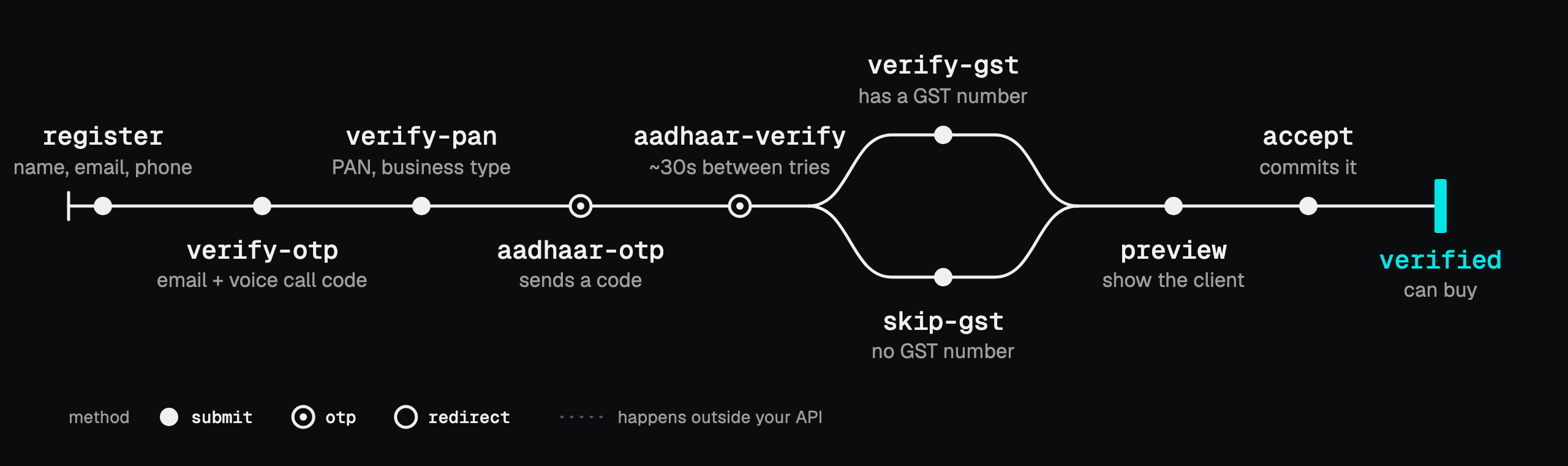
| 1 | `register` | `name`, `email`, `phone` | `submit` | `verify-otp` |
| 2 | `verify-otp` | `mobile_otp`, `email_otp` | `submit` | `verify-pan` |
| 3 | `verify-pan` | `pan`, `business_type` | `submit` | `aadhaar-otp` |
| 4 | `aadhaar-otp` | `aadhaar` | `otp` | `aadhaar-verify` |
| 5 | `aadhaar-verify` | `otp` | `otp` | `verify-gst` |
| 6 | `verify-gst` **or** `skip-gst` | `gst`, or nothing | `submit` | `preview` |
| 7 | `preview` | none | `submit` | `accept` |
| 8 | `accept` | none | `submit` | `null`: verified |
- **Two codes at `verify-otp`.** The email code arrives in the client's inbox. The mobile code
arrives as an automated voice call that reads it out. If one did not arrive, call `resend-otp`
with `type` set to `email`, `mobile`, or `both` (the default). It is never returned as a
`next_step`.
- **`business_type`** is `proprietorship`, `company`, or `firm`.
- **GST is a choice here.** Run `verify-gst` with the GST number, or `skip-gst`.
- **`preview` returns what the client confirms** before `accept` commits it. Anything the
verification provider does not hold yet is left out, so treat each block as optional.
```json
{
"success": true,
"status": "preview",
"next_step": "accept",
"message": "Review the details, then call accept.",
"preview": {
"client": { "name": "Demo User", "email": "demo@example.com", "mobile": "9876543210", "country_code": "91" },
"pan": { "pan": "ABCDE1234F", "business_type": "proprietorship" },
"aadhar": { "name": "Demo User", "address": "..." },
"gst": { "gst_num": "29ABCDE1234F1Z5", "gstin": "..." }
}
}
```
---
## Carrier 2 [#carrier-2-new]
Send `"carrier": "carrier-2-new"` with region `IN`, mobile numbers.
| # | Step | Fields you send | `method` | `next_step` after it |
|---|---|---|---|---|
| 1 | `register` | `name`, `email`, `phone` | `submit` | `verify-otp` |
| 2 | `verify-otp` | `mobile_otp`, `email_otp` | `submit` | `verify-pan` |
| 3 | `verify-pan` | `pan`, `business_type` | `submit` | `aadhaar-otp` |
| 4 | `aadhaar-otp` | `aadhaar` | `otp` | `aadhaar-verify` |
| 5 | `aadhaar-verify` | `otp` | `otp` | `verify-gst` |
| 6 | `verify-gst` **or** `skip-gst` | `gst`, or nothing | `submit` | `preview` |
| 7 | `preview` | none | `submit` | `accept` |
| 8 | `accept` | none | `submit` | `null`: verified |
- **Two codes at `verify-otp`.** The email code arrives in the client's inbox. The mobile code
arrives as an automated voice call that reads it out. If one did not arrive, call `resend-otp`
with `type` set to `email`, `mobile`, or `both` (the default). It is never returned as a
`next_step`.
- **`business_type`** is `proprietorship`, `company`, or `firm`.
- **GST is a choice here.** Run `verify-gst` with the GST number, or `skip-gst`.
- **`preview` returns what the client confirms** before `accept` commits it. Anything the
verification provider does not hold yet is left out, so treat each block as optional.
```json
{
"success": true,
"status": "preview",
"next_step": "accept",
"message": "Review the details, then call accept.",
"preview": {
"client": { "name": "Demo User", "email": "demo@example.com", "mobile": "9876543210", "country_code": "91" },
"pan": { "pan": "ABCDE1234F", "business_type": "proprietorship" },
"aadhar": { "name": "Demo User", "address": "..." },
"gst": { "gst_num": "29ABCDE1234F1Z5", "gstin": "..." }
}
}
```
---
## Carrier 2 [#carrier-2-new]
Send `"carrier": "carrier-2-new"` with region `IN`, mobile numbers.
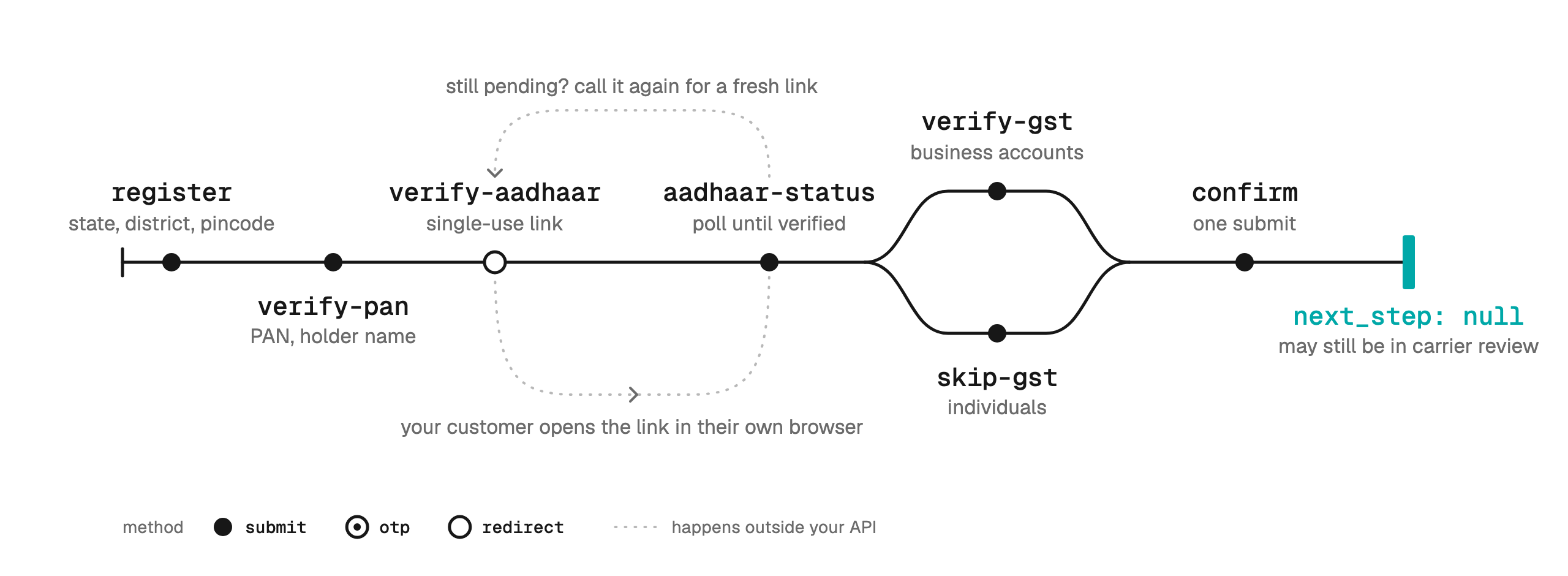
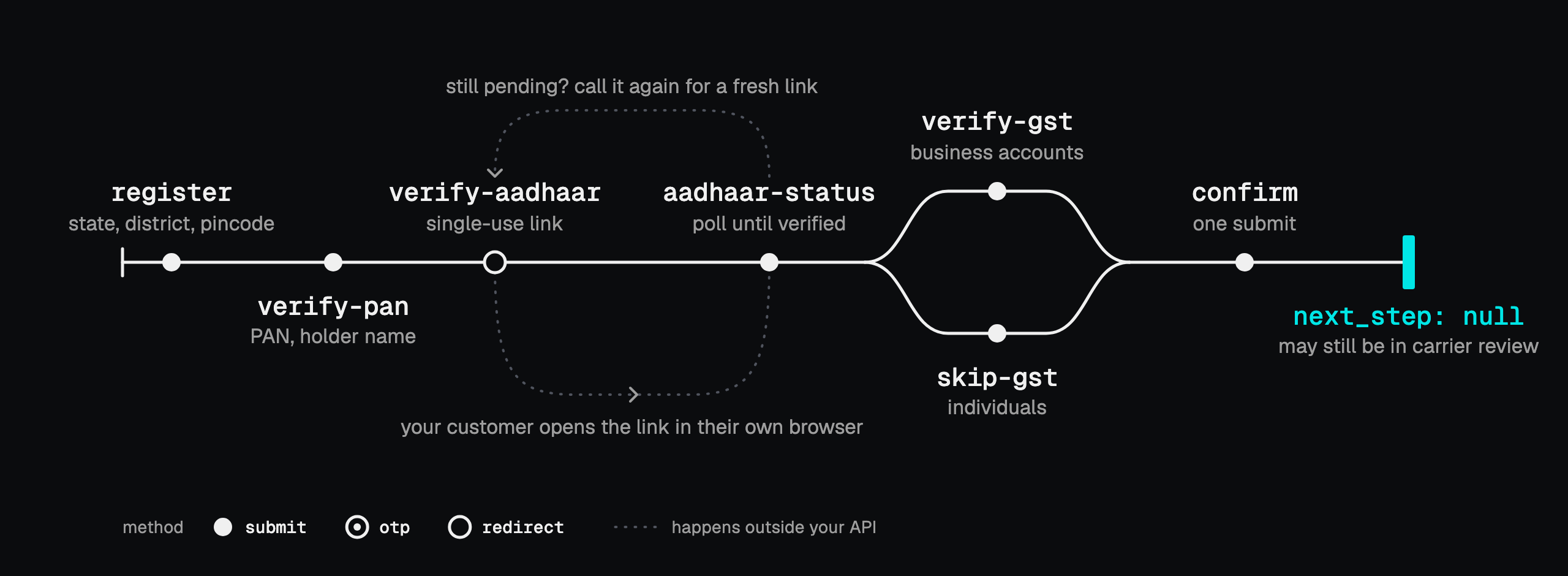 No codes are sent on this carrier. Instead, each check is followed by its document, and the
account type decides whether there is a GST step.
| # | Step | Fields you send | `method` | `next_step` after it |
|---|---|---|---|---|
| 1 | `register` | `name`, `email`, `phone`, `state`, `district`, `pincode`, `account_type`, and `business_name` for a business | `submit` | `verify-pan` |
| 2 | `verify-pan` | `pan`, `pan_holder_name` | `submit` | `upload-pan` |
| 3 | `upload-pan` | the PAN card in `document` | `upload` | `verify-aadhaar` |
| 4 | `verify-aadhaar` | optionally `return_url` | `redirect` | `aadhaar-status` |
| 5 | `aadhaar-status` | none | `submit` | `upload-aadhaar` once verified |
| 6 | `upload-aadhaar` | the Aadhaar document in `document` | `upload` | business: `verify-gst`. Individual: `confirm` |
| 7 | `verify-gst` | `gst` | `submit` | `upload-gst` |
| 8 | `upload-gst` | the GST certificate in `document` | `upload` | `confirm` |
| 9 | `confirm` | none | `submit` | `null` |
Steps 7 and 8 are for business accounts only. So the two paths are:
- **Individual:** `register`, `verify-pan`, `upload-pan`, `verify-aadhaar`, `aadhaar-status`,
`upload-aadhaar`, `confirm`.
- **Business:** the same, with `verify-gst` and `upload-gst` before `confirm`.
### Register: the account type is permanent [#register-the-account-type-is-permanent]
`account_type` is `individual` (the default) or `business`, and it cannot be changed after
`register`. A business must also send `business_name`, exactly as it appears on its GST
certificate, because the GST check compares the two.
`phone` is a 10-digit mobile number and `pincode` a 6-digit PIN code. The `district` is checked
against the `state`, and a mismatch is refused with nothing written.
---
## US carrier [#carrier-us]
Send `"carrier": "carrier-us"` with region `US`, US local numbers.
No codes are sent on this carrier. Instead, each check is followed by its document, and the
account type decides whether there is a GST step.
| # | Step | Fields you send | `method` | `next_step` after it |
|---|---|---|---|---|
| 1 | `register` | `name`, `email`, `phone`, `state`, `district`, `pincode`, `account_type`, and `business_name` for a business | `submit` | `verify-pan` |
| 2 | `verify-pan` | `pan`, `pan_holder_name` | `submit` | `upload-pan` |
| 3 | `upload-pan` | the PAN card in `document` | `upload` | `verify-aadhaar` |
| 4 | `verify-aadhaar` | optionally `return_url` | `redirect` | `aadhaar-status` |
| 5 | `aadhaar-status` | none | `submit` | `upload-aadhaar` once verified |
| 6 | `upload-aadhaar` | the Aadhaar document in `document` | `upload` | business: `verify-gst`. Individual: `confirm` |
| 7 | `verify-gst` | `gst` | `submit` | `upload-gst` |
| 8 | `upload-gst` | the GST certificate in `document` | `upload` | `confirm` |
| 9 | `confirm` | none | `submit` | `null` |
Steps 7 and 8 are for business accounts only. So the two paths are:
- **Individual:** `register`, `verify-pan`, `upload-pan`, `verify-aadhaar`, `aadhaar-status`,
`upload-aadhaar`, `confirm`.
- **Business:** the same, with `verify-gst` and `upload-gst` before `confirm`.
### Register: the account type is permanent [#register-the-account-type-is-permanent]
`account_type` is `individual` (the default) or `business`, and it cannot be changed after
`register`. A business must also send `business_name`, exactly as it appears on its GST
certificate, because the GST check compares the two.
`phone` is a 10-digit mobile number and `pincode` a 6-digit PIN code. The `district` is checked
against the `state`, and a mismatch is refused with nothing written.
---
## US carrier [#carrier-us]
Send `"carrier": "carrier-us"` with region `US`, US local numbers.
 Business verification rather than identity verification: no codes, no PAN, no Aadhaar. Three
forms, then one submit that hands everything to the carrier's review.
| # | Step | Fields you send | `method` | `next_step` after it |
|---|---|---|---|---|
| 1 | `business-info` | `business_name`, `business_type`, `business_identity`, `business_industry`, `ein`, `website_url`, and optionally `regions_of_operation` | `submit` | `business-address` |
| 2 | `business-address` | `street`, `city`, `state`, `postal_code`, and optionally `country` | `submit` | `authorized-rep` |
| 3 | `authorized-rep` | `first_name`, `last_name`, `email`, `phone`, `business_title`, `job_position` | `submit` | `confirm` |
| 4 | `confirm` | none | `submit` | `null` |
- `business_type`, `business_identity`, `business_industry`, `regions_of_operation`, and
`job_position` come from fixed lists. Read them from `choices` on KYC requirements.
- After `confirm`, `status` is `completed` and `review_status` is `pending_review`.
`refresh-review` asks the carrier where its review stands. It is never returned as a
`next_step`, so call it when you want an update, about 30 seconds apart.
---
## The redirect step [#the-redirect-step]
```json
{
"status": "aadhaar_pending",
"method": "redirect",
"redirect_url": "https://provider.example/verify/one-time-link",
"reusable": false,
"poll_step": "aadhaar-status"
}
```
The link is good for one attempt. It carries a provider token that expires within minutes, so do
not store it and never serve a stored one. If the client closes the tab or the link expires, run
the step again for a fresh link, about 30 seconds apart.
Pass `return_url` to bring the client back into your own app, for example
`https://app.example.com/kyc/done`. It must be `https` with a host, no `#fragment`, and no
credentials, up to 2,000 characters. Whatever you do, polling `poll_step` is what completes the
step, so poll even if the browser never comes back.
## The upload step [#the-upload-step]
On carriers that need documents, each check is followed by its document, and `next_step` points at
the upload when one is due. Send the step as `multipart/form-data`:
```bash
curl -X POST https://backend.omnidim.io/api/v1/reseller/kyc/steps/upload-pan \
-H "Authorization: Bearer $OMNIDIM_API_KEY" \
-F user_id=CLIENT_ID -F region=IN -F carrier=carrier-2-new \
-F document=@pan-card.pdf
```
The file must be a JPG, PNG, or PDF up to 10 MB, and its contents must match its extension. The
step name decides which document it is, so there is no type field to send. Uploading again
replaces the earlier document.
## Errors [#errors]
| Status | Slug | Meaning |
|---|---|---|
| 400 | `invalid_request` | A field is missing, outside its fixed list, or in the wrong shape. `/requirements` publishes `choices` and `patterns` |
| 409 | `step_order` | You ran a step too early. `next_step` says which one to run first |
| 409 | `carrier_required` | The region has more than one carrier and the call named none |
| 422 | `verification_failed` | The details or the file were refused. Fix them with the client |
| 429 | `too_fast` | An Aadhaar step was retried within about 30 seconds |
| 503 | `service_unavailable` | The verification service is down. Nothing is wrong with the details. Retry in a few minutes |
A `step_order` refusal does not start the wait. If the client did not get their code, call `resend-otp`
while they are on the OTP step.
You are passing what your client types into your interface, nothing more. Do not store the
values you send, and redact them from your logs. That covers the PAN, the Aadhaar number, every
one-time code, the GST number, the redirect link, and every document file.
Business verification rather than identity verification: no codes, no PAN, no Aadhaar. Three
forms, then one submit that hands everything to the carrier's review.
| # | Step | Fields you send | `method` | `next_step` after it |
|---|---|---|---|---|
| 1 | `business-info` | `business_name`, `business_type`, `business_identity`, `business_industry`, `ein`, `website_url`, and optionally `regions_of_operation` | `submit` | `business-address` |
| 2 | `business-address` | `street`, `city`, `state`, `postal_code`, and optionally `country` | `submit` | `authorized-rep` |
| 3 | `authorized-rep` | `first_name`, `last_name`, `email`, `phone`, `business_title`, `job_position` | `submit` | `confirm` |
| 4 | `confirm` | none | `submit` | `null` |
- `business_type`, `business_identity`, `business_industry`, `regions_of_operation`, and
`job_position` come from fixed lists. Read them from `choices` on KYC requirements.
- After `confirm`, `status` is `completed` and `review_status` is `pending_review`.
`refresh-review` asks the carrier where its review stands. It is never returned as a
`next_step`, so call it when you want an update, about 30 seconds apart.
---
## The redirect step [#the-redirect-step]
```json
{
"status": "aadhaar_pending",
"method": "redirect",
"redirect_url": "https://provider.example/verify/one-time-link",
"reusable": false,
"poll_step": "aadhaar-status"
}
```
The link is good for one attempt. It carries a provider token that expires within minutes, so do
not store it and never serve a stored one. If the client closes the tab or the link expires, run
the step again for a fresh link, about 30 seconds apart.
Pass `return_url` to bring the client back into your own app, for example
`https://app.example.com/kyc/done`. It must be `https` with a host, no `#fragment`, and no
credentials, up to 2,000 characters. Whatever you do, polling `poll_step` is what completes the
step, so poll even if the browser never comes back.
## The upload step [#the-upload-step]
On carriers that need documents, each check is followed by its document, and `next_step` points at
the upload when one is due. Send the step as `multipart/form-data`:
```bash
curl -X POST https://backend.omnidim.io/api/v1/reseller/kyc/steps/upload-pan \
-H "Authorization: Bearer $OMNIDIM_API_KEY" \
-F user_id=CLIENT_ID -F region=IN -F carrier=carrier-2-new \
-F document=@pan-card.pdf
```
The file must be a JPG, PNG, or PDF up to 10 MB, and its contents must match its extension. The
step name decides which document it is, so there is no type field to send. Uploading again
replaces the earlier document.
## Errors [#errors]
| Status | Slug | Meaning |
|---|---|---|
| 400 | `invalid_request` | A field is missing, outside its fixed list, or in the wrong shape. `/requirements` publishes `choices` and `patterns` |
| 409 | `step_order` | You ran a step too early. `next_step` says which one to run first |
| 409 | `carrier_required` | The region has more than one carrier and the call named none |
| 422 | `verification_failed` | The details or the file were refused. Fix them with the client |
| 429 | `too_fast` | An Aadhaar step was retried within about 30 seconds |
| 503 | `service_unavailable` | The verification service is down. Nothing is wrong with the details. Retry in a few minutes |
A `step_order` refusal does not start the wait. If the client did not get their code, call `resend-otp`
while they are on the OTP step.
You are passing what your client types into your interface, nothing more. Do not store the
values you send, and redact them from your logs. That covers the PAN, the Aadhaar number, every
one-time code, the GST number, the redirect link, and every document file.